
Tasmota E27 RGB Smart LED Bulb 10W WiFi – Home Assistant Compatible


Tasmota E27 RGB Smart LED Bulb 10W WiFi – Home Assistant Compatible
SPECIFICATIONS
Area: 5-8㎡
Average Life (hrs): 40000
Base Type: E27
Beam Angle(°): 120°
Brand Name: DOITING
Certification: ce,EMC,FCC,LVD,ROHS,UL,UL,RoHS,FCC,EMC,CE
Choice: yes
Color Temperature: 2700K~6500K
High-concerned chemical: None
Is Smart Device: Yes
Item Type: LED bulbs
LED Chip Brand: sharp
LED Chip Model: SMD5050
Led Bulb Type: Spotlight Bulb
Length: 11.4cm
Luminous Flux: 249-2000,500 - 999 Lumens
Occasion: Bedroom
Origin: Mainland China
Power Source: DC
Power Tolerance: 5%
Shape: U-Shaped
Voltage: 85-265V
Warranty: 3years
Our store's LED products follow international power deviation standards.
When the rated power of the lamp is not greater than 5W, its deviation should not exceed 0.5W.
When the rated power of the lamp is greater than 5W, the deviation should not exceed 10% of the rated value.
AC220-240V or AC110-130V narrow voltage LED lights will also have a certain power increase according to the increase in voltage. For example, the working power of the same AC220-240V narrow voltage LED lamp is 4.5W at 220V voltage and 5W at 230V voltage.
Our store's lighting fixtures are all intelligent and support brightness adjustment. If you feel that the power is too high, you can lower the brightness and power. We aim to provide you with products that meet your expectations.
Please carefully read the SKU details and product description before purchasing to avoid unnecessary disputes.
Pre Flashed TASMOTA E27 WiFi Smart Bulb
The latest full version
Fully compatible with official Tasmota official OTA
Pre configed IOs plug and play
Pre flashed before assembling
Build in ESP8285 chip with 2M flash
Total local control with quick setup and updates.
Control using MQTT, Web UI, HTTP or serial. Automate using timers, rules or scripts. Integration with home automation solutions. Incredibly expandable and flexible.
Parameter:
Product Name: TASMOTA WIFI BULB
Voltage: AC 85~265V
power: 10W
Lamp holder: E27
Size: 6*6*11.4CM
Installation
Step 1: Power device, and use phone to connect AP SSID named “AiYaTo-xxxx-xxxxxx”.
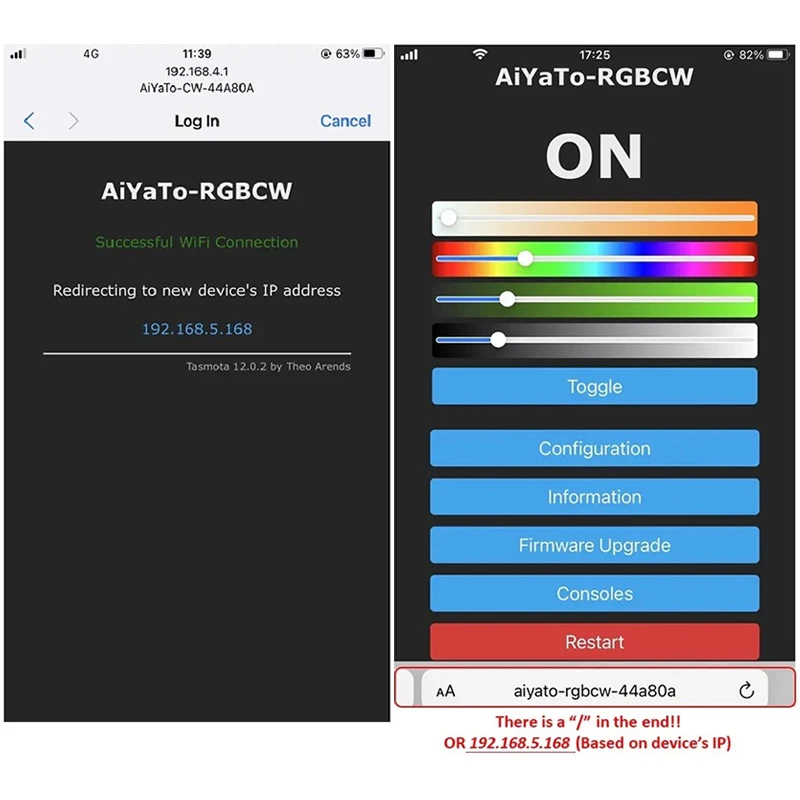
Step 2:In pop-up window, key your CORRECTWi-Fi router name and password. If window doesn’t pop-up, please land http://192.168.4.1 in phone’s browser. Wait a while, then the browser will show the device IP address. ( just like 192.168.x.x)
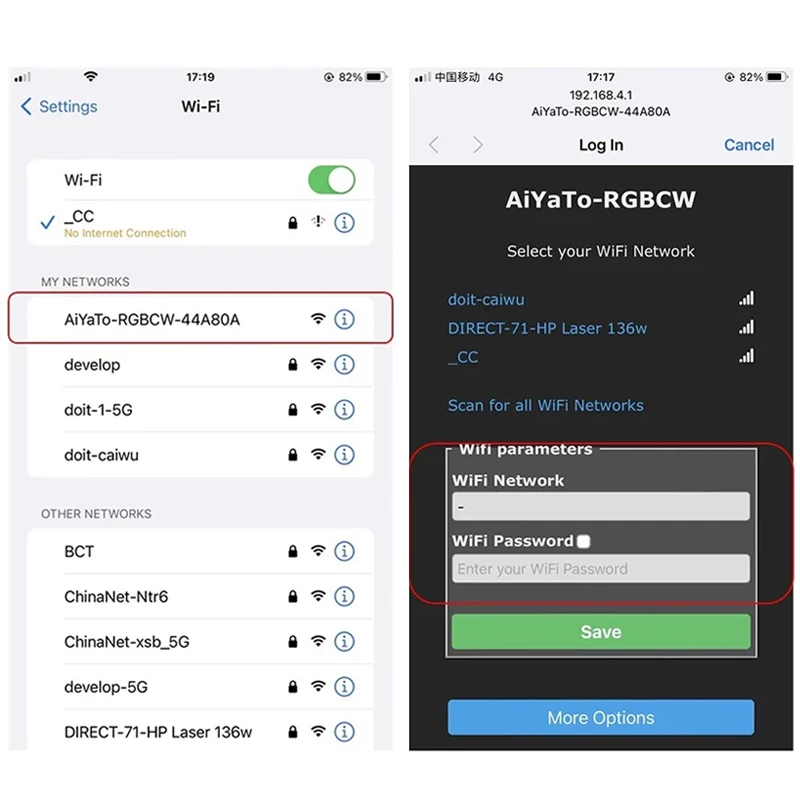
Step 3:Connect Wi-Fi router with your phone. Then key “AiYaTo-xxxx-xxxxxx/” (there are a “/” in the end) in phone’s browser. Or you can land the device IP address gotten by Step 2. Here, device can be controlled by WebUI.Enjoy it.
GPIOs
GPIO4 -- PWM1 -- Cool White
GPIO5 -- PWM4 -- Blue Color
GPIO12 -- PWM2 -- Red Color
GPIO13 -- PWM5 -- Warm White
GPIO14 -- PWM3 -- Green Color
Tasmota Template
{"NAME":"AiYaTo-RGBCW","GPIO":[0,0,0,0,419,418,0,0,416,420,417,0,0,0],"FLAG":0,"BASE":18}
Note:
1.How to restore the device.
— Without Button:Reset the device over 3 times with an interval of no more than 5 seconds each time.
The device will self-test it and release the AP SSID about 5 seconds later.
2. WebUI control
A: Power the device, the product willkeep the last device state when it is closed.
3.OTA upgrade
OTA use zbbridgeversion and the flash is 2M byte. Please DON'T use 1M flash version.The first rule of upgrading: If it isn't broke, don't fix it!!
4. Control device with button
A: Short-pressthebutton will change the device state.
5. Tasmota device ONLY support 2.4GHz Wi-Fi router.